What Is a Stripboard? How to Build One That Survives Day 1
Scheduling
A stripboard is one strip per scene, color-coded and arranged into shoot days. Here's how to read it, build one, and the constraints that decide whether it survives Day 1.
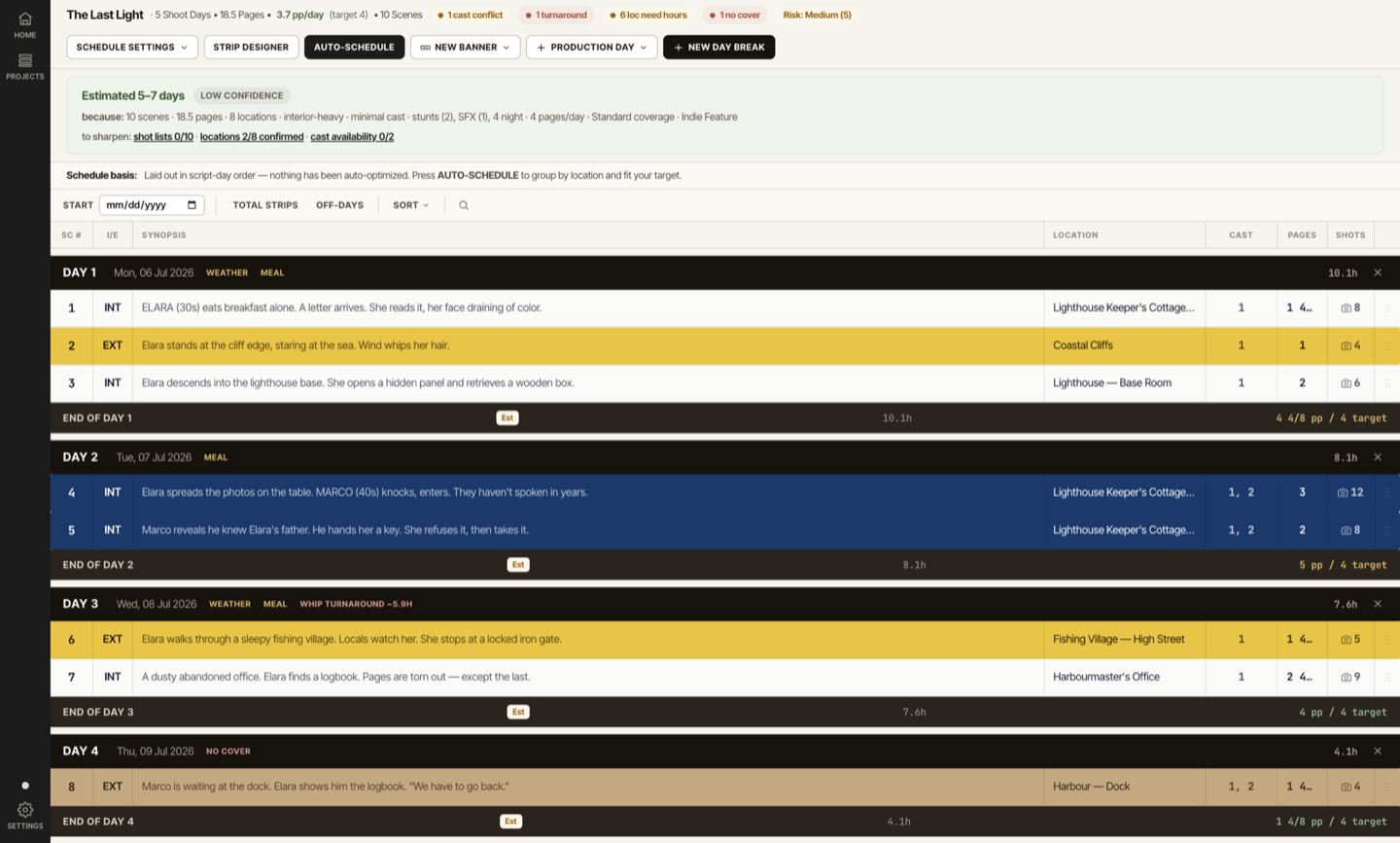
A stripboard is the scene-by-scene chart a 1st AD uses to build a shooting schedule: one strip per scene, color-coded by day, night, interior, and exterior, arranged into shoot days separated by day breaks. Move a strip and the schedule underneath it moves too.
Every shooting schedule looks perfect until Day 1. The board reads clean on a laptop: the days are balanced, the pages add up, the order makes sense. Then a night scene runs long, a cast hold turns out to be wrong, and the schedule you built two weeks ago doesn't hold.
This guide covers what a stripboard actually is, how to read the color code, what goes on one strip, and how to build a shooting schedule around the constraints that decide whether it survives contact with the set. There's a free stripboard template at the end.
What a Stripboard Actually Is
Traditionally a stripboard was a physical board: cardboard strips of paper, one per scene, slotted into a metal frame. Almost no film shoots in script order, so the strips let an AD reorder scenes into an efficient sequence without touching the script itself.
Reorder the strips and you get the shooting schedule: the order scenes actually get filmed in, grouped by location and cast, not by story order. The stripboard is the tool. The shooting schedule is what it produces once the strips are locked.
Digital scheduling software replaced the cardboard, first Movie Magic Scheduling, then browser-based tools, but the job is identical. You still have one strip per scene, you still drag them into an order, and you still watch the day totals change as you go.
What's on One Strip
Every strip carries the same fields, whether it's a paper card or a row in an app. Read left to right and you have everything you need to schedule the scene:
- Scene number: ties the strip back to the script and the breakdown sheet
- INT or EXT: interior or exterior, because it drives lighting, sound, and weather exposure
- Day or night: the time of day the scene is set in, not the time you actually shoot it
- Set or location: where the scene physically happens
- Cast: which numbered cast members appear, so a conflict shows up at a glance
- Page count in eighths: how much screen time the scene runs, the currency the whole day is planned in
- A one-line synopsis: enough to identify the scene without rereading the script
That page count matters more than it looks. A day is planned in eighths, so undercounting a scene by even a quarter page throws off every day after it. If you haven't counted pages properly yet, our breakdown guide covers it before you ever touch the board.
Reference · Anatomy
One stripboard strip, field by field
- 1Scene numberTies the strip back to the script and the breakdown sheet.
- 2INT or EXTInterior or exterior, which drives lighting, sound, and weather exposure.
- 3Day or nightThe time of day the scene is set in, not the time you actually shoot it.
- 4Set or locationWhere the scene physically happens, so the board can group by location.
- 5One-line synopsisEnough to identify the scene without rereading the script.
- 6Cast numbersWhich numbered cast members appear, so a conflict shows up at a glance.
- 7Page count in 1/8How much screen time the scene runs, the currency the whole day is planned in.
Reading the Board: The Stripboard Color Code
Scan a stripboard for two seconds and the colors already tell you what kind of day you're looking at. A wall of yellow is a heavy exterior day. A run of blue is a night shoot. That's the point of the code: read the shape of a day before you read a single word on it.
Reference · Stripboard Colors
The Stripboard Color Code
Don't confuse this with the script breakdown color code, the one that tags cast in red and props in purple on a marked-up script. Same idea, different job. Breakdown colors tag elements inside a scene. Stripboard colors tag the scene itself, by when and where it happens.
Day Breaks and Company Moves
A day break is the line between one shoot day and the next. Everything above it is Day 1, everything below is Day 2, and the break itself usually totals the day: hours, pages, scene count. Move a strip across a day break and you've changed what shoots on two different days at once.
A company move is what happens when the whole crew packs up and relocates mid-shoot: trucks, gear, base camp, everyone. It is the single most expensive thing a schedule can hide, because the drive doesn't show up as a strip. It just eats the hours between two of them.
A company move belongs at the edge of a day, over a meal break or overnight, never buried in the middle of it.
Group scenes by location first, then worry about story order. Every time the board sends the crew back to a location it already wrapped, you're paying for a second company move you didn't need.
The Constraints That Actually Build the Schedule
A stripboard looks like a sequencing puzzle. It's actually a constraint problem wearing a sequencing puzzle's clothes. These are the constraints that decide whether an order is even legal, before you get to whether it's efficient:
- Cast availability and holds: if your lead is only free for two weeks, their scenes have to land inside that window, full stop
- Location hours: a location that closes at 6pm caps the day regardless of how many pages are left
- Day length: the hours you can reasonably run before the day goes into meal penalties and diminishing returns
- Turnaround: the rest a cast or crew member is owed between wrap one day and call the next; see turnaround math for how the count actually works and why a night-to-day swing is the one that bites
Sequence the board without checking these and you get a schedule that reads fine and breaks the moment someone runs the numbers. Check them as you go and the order you land on is the one that can actually be shot.
How to Build a Shooting Schedule, Step by Step
Start from the breakdown
Every strip's fields (cast, location, page count) come straight off a finished script breakdown, so build that first.
Group by location
Pull every scene at the same set together before you think about anything else.
Sequence around cast availability
Lock the scenes tied to a hard-out actor or a limited window first, then fill in around them.
Build in day length and turnaround
Check every day break against the turnaround owed from the day before, especially night-to-day swings.
Put company moves at the edges of a day
Overnight or over a meal break, never mid-afternoon.
Leave a cover set for weather
Every exterior day needs an interior scene ready to swap in if the sky doesn't cooperate.
Walk the board day by day before you lock it
Read each day break top to bottom and ask what could go wrong, not just what fits.
Before you lock the board, walk these four one more time. Each one is a clean-looking schedule's favorite place to hide a Day 1 problem.
- Every day break clears the turnaround owed from the day before
- No single day hides two company moves
- Every exterior day has a cover set ready to swap in
- Every cast hold is confirmed in writing, not assumed
Why the "Perfect" Schedule Breaks on Day 1
A stripboard can look balanced (even pages per day, sensible order) and still fail on the first morning. The failures are rarely dramatic. They're small oversights that compound:
- A night-to-day turnaround nobody checked. Wrap a night scene at 4am, call an early exterior the next day, and you've built a forced call into the schedule before anyone even shows up.
- Two company moves in one day. It looked like a normal Tuesday on the board. It's actually three locations and two drives, and the day runs four hours past wrap.
- No cover set on the one exterior day with real weather risk. The rain doesn't care that the schedule was locked.
- A cast hold nobody confirmed in writing. "They said they're free that week" is not a hold. An unconfirmed hold is a scheduling assumption wearing a fact's clothes.
- A minor's on-set hours pushed past the limit because the schedule was built around the adult cast first and the minor's regulated hours were an afterthought.
Stripboard by Hand vs. Stripboard in Software
Plenty of productions still build a stripboard on paper, and there's nothing wrong with that on a small shoot. The strips force you to think in scenes instead of pages, and physically laying them out builds an intuition for the schedule that a spreadsheet doesn't.
Where paper runs out of road is the constraint-checking. A person can hold maybe a dozen variables in their head at once. A real schedule has cast holds, location hours, turnaround, and day length all interacting across every single day, and paper has no way to flag when two of them collide.
AD PrePro's stripboard lets you drag strips by hand or auto-schedule from your breakdown, and it checks cast holds, location hours, day length, and turnaround as you go, flagging the day that breaks a constraint instead of leaving you to find it on set. You still make the call on every scene. It just tells you when a move creates a problem you'd otherwise catch on Day 1.
Free Shooting Schedule / Stripboard Template
If you're building a board by hand, start from a real template instead of a blank spreadsheet. Our free shooting schedule template lays out every strip field (scene number, INT/EXT, day/night, set, cast, page count) with the standard color code built in, ready to fill scene by scene.
It's the same structure the software automates, so nothing about your method changes if you move from paper to a tool later.
Stripboard FAQ
What is a stripboard in film production? A stripboard is a chart of one strip per scene, color-coded by interior/exterior and day/night, arranged into shoot days. Rearranging the strips is how a 1st AD turns a script into a shooting schedule.
What's the difference between a stripboard and a shooting schedule? The stripboard is the working tool, the strips you reorder while you're still figuring out the plan. The shooting schedule is the result once the strips are locked: the day-by-day plan that gets distributed to cast and crew.
What do the colors on a stripboard mean? White is interior day, blue is interior night, yellow is exterior day, green is exterior night, and tan covers dusk, dawn, or magic hour. The color reflects when and where a scene happens, not what happens in it.
Who builds the stripboard on a production? The 1st AD builds and owns it, usually working from a breakdown the AD department produced, with input from the producer and department heads on cast and location constraints.
Do productions still use physical stripboards? Some do, mostly smaller shoots where a producer or AD prefers working with cards by hand. Most productions now use scheduling software, but the strip, the fields on it, and the color code are unchanged from the paper version.
How do I turn a script into a shooting schedule? Break the script down scene by scene first, then build strips from that breakdown, group them by location, sequence around cast availability and turnaround, and walk the finished board day by day before you lock it.
Build the Schedule That Holds
A stripboard is one strip per scene, color-coded and arranged into shoot days. Building one that survives Day 1 comes down to the constraints underneath the order: cast holds, location hours, turnaround, and a cover set for the day the weather doesn't cooperate.
AD PrePro builds your stripboard straight from your script breakdown, drag by hand or auto-scheduled, and checks cast holds, location hours, day length, and turnaround as you build. Upload a script and start with a board that already knows its constraints.